017 1223 6015






 017 1223

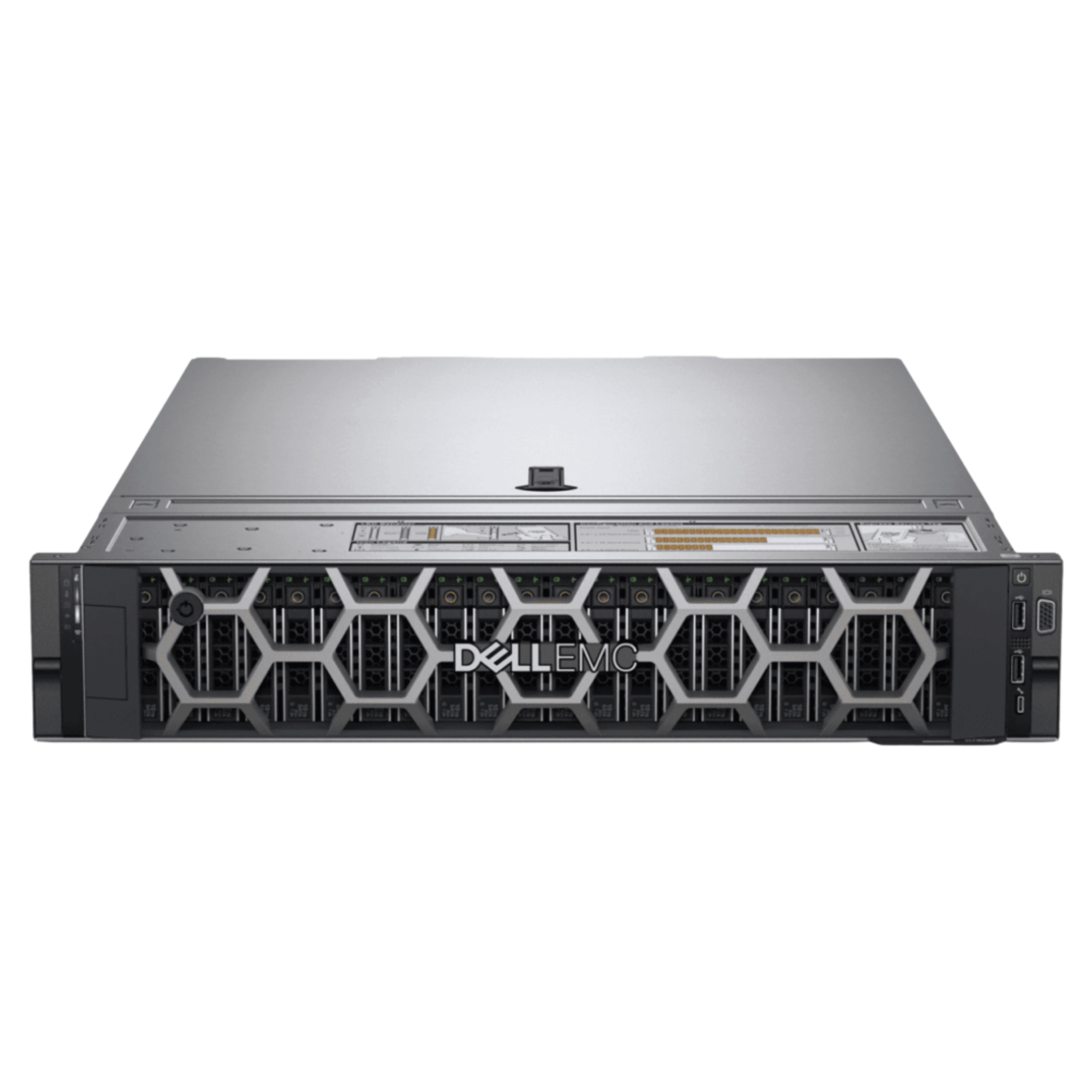
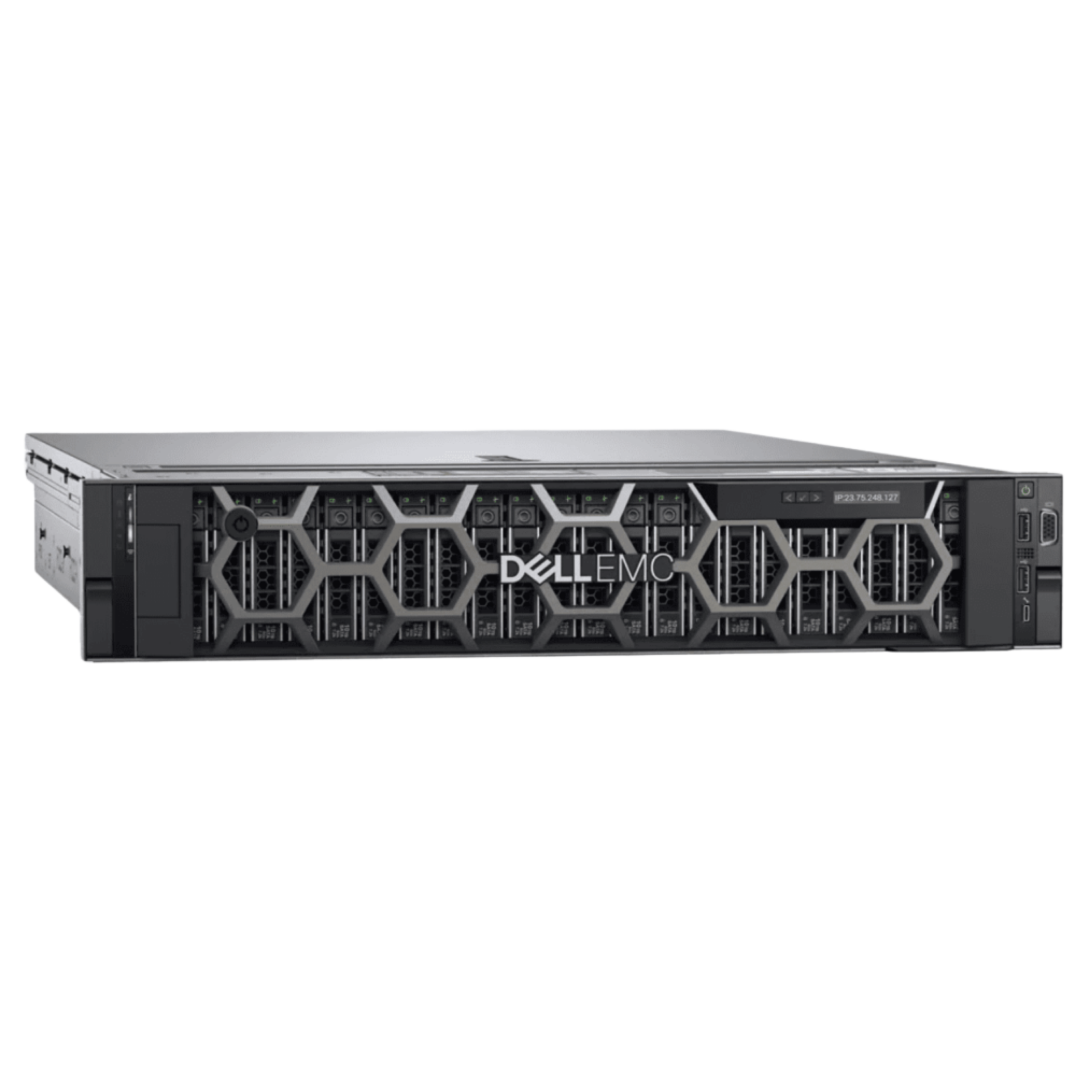
If your business runs serious applications — virtualization hosting 100+ virtual machines, database servers handling millions of transactions, high-performance computing, or storage-intensive workloads — a regular server will not cut it.
The Dell PowerEdge R740xd is built for exactly that workload. It is a powerhouse that sits in the sweet spot between mid-range and ultra-enterprise. Real performance at a price that makes sense.
This unit is in excellent refurbished condition. Fully tested, verified, and ready to deploy into your data center immediately.
What Is the R740xd and Why Is It Different?
The Dell PowerEdge R740xd is a 2U rack mount server designed for demanding workloads. The “xd” designation is critical — it stands for “extra drive bays.”
Compare two 2U Dell servers:
- R740: Standard configuration, 4-12 drive bays
- R740xd: Expanded storage, 24 drive bays
The R740xd is built for organizations that need:
- ✅ Massive amounts of fast storage
- ✅ High-performance computing workloads
- ✅ Large-scale virtualization
- ✅ Heavy database operations
- ✅ GPU acceleration capability
This is not a general-purpose server. This is a specialized workhorse.
Dual Intel Xeon Gold 6152 — Serious Processing Power
The R740xd comes with two Intel Xeon Gold 6152 processors. Let that sink in.
Total capacity: 44 cores / 88 threads
For context:
- Consumer PC: 4-8 cores
- Gaming workstation: 12-16 cores
- Regular server: 8-16 cores
- R740xd: 44 cores (this server)
What does 44 cores do?
Virtualization: Run 100-150 virtual machines simultaneously, each with dedicated CPU resources.
Database: Handle massive databases with thousands of concurrent queries.
Scientific Computing: Run complex simulations and calculations.
Video Rendering: Render high-resolution video in fraction of the time.
Machine Learning: Train AI models with massive datasets.
Data Analysis: Process terabytes of data quickly.
More cores means work gets done faster. A job that would take a regular server 100 hours takes the R740xd 2-3 hours.
44 Cores — What This Means for Your Business
If you are running a data center:
- ✅ One R740xd can replace 5-10 smaller servers
- ✅ Consolidation saves rack space
- ✅ Consolidation saves power costs
- ✅ Consolidation simplifies management
- ✅ Consolidation reduces cooling requirements
If you are running virtualization:
- ✅ Host 100+ virtual machines on single server
- ✅ Each VM gets adequate CPU resources
- ✅ No CPU contention or slowdowns
- ✅ Workloads run smoothly
- ✅ More efficient hardware utilization
If you are running databases:
- ✅ Large databases process queries instantly
- ✅ Parallel processing improves performance
- ✅ More concurrent users supported
- ✅ Complex analytics complete quickly
- ✅ Real-time reporting becomes possible
32GB RAM — Working Memory for Complex Tasks
32GB of DDR4 ECC Registered memory is substantial.
But here is the critical part — the R740xd supports up to 24 DIMM slots. This means you can upgrade to 768GB of RAM if needed.
Starting with 32GB, you get:
- ✅ Adequate for most virtualization workloads
- ✅ Sufficient for database caching
- ✅ Good starting point for HPC applications
- ✅ Room to upgrade as needs grow
Upgrading is simple — pop out old DIMMs, insert new ones. No server shutdown needed (with proper planning).
24 × 2.5″ Drive Bays — Storage Beast
This is what makes the R740xd special. 24 drive bays for 2.5-inch drives.
What can you fit?
Option 1: All SSD
- 24 × 960GB SSD = 23TB of fast NVMe-equivalent storage
- Perfect for: High-performance databases, real-time analytics
Option 2: All HDD
- 24 × 2TB SAS = 48TB of storage
- Perfect for: Large file servers, backup targets, data warehousing
Option 3: Mixed (Typical)
- 10 × 960GB SSD (fast tier) = 9.6TB
- 14 × 4TB HDD (capacity tier) = 56TB
- Total: 65.6TB accessible storage
- Perfect for: Tiered storage, performance + capacity
Why does storage quantity matter?
A small server with 2-4 drives runs out of space quickly. A production database or virtualization environment fills 4 drives in weeks.
The R740xd with 24 bays eliminates storage anxiety. You have room to grow.
Storage Flexibility — Multiple Drive Types Supported
The R740xd supports:
SAS Drives — Enterprise-grade fast storage
- High reliability (24/7 operation rated)
- Fast performance (15,000 RPM typical)
- Expensive but dependable
- Standard for databases and high-performance systems
SATA Drives — Consumer-grade capacity storage
- Lower cost
- Lower performance
- Still reliable for less critical workloads
- Good for backup and archive storage
SSD Drives — Solid-state, no moving parts
- Extremely fast (no mechanical delay)
- Reliable (no spinning parts to fail)
- Expensive per GB but worth it for hot data
- Perfect for database indexes and frequently accessed data
NVMe Drives — Ultra-fast next-generation storage
- Fastest possible storage
- Through PCIe, not SATA
- Limited compatibility (needs PCIe to M.2 adapters)
- Perfect for compute-intensive applications
The ability to mix drive types means you can:
- ✅ Put hot data on SSD
- ✅ Put warm data on SAS
- ✅ Archive cold data on SATA
- ✅ Optimize cost vs performance
- ✅ Grow storage over time
RAID Controller — Data Protection
The R740xd includes a Dell PERC RAID controller.
RAID (Redundant Array of Independent Disks) protects against drive failure.
RAID 1 (Mirroring)
- Two drives, one is mirror of the other
- If one fails, the other keeps your data safe
- 50% storage efficiency (need 2TB to get 1TB usable)
- Recommended for: Critical data that must not be lost
RAID 5 (Striping with Parity)
- Three or more drives
- If one drive fails, data is reconstructed from parity
- 67-80% storage efficiency
- Recommended for: Most production systems
RAID 6 (Double Parity)
- Four or more drives
- If two drives fail simultaneously, data is safe
- 50-75% storage efficiency
- Recommended for: Large arrays where failure risk is higher
RAID 10 (Mirrored Striping)
- Combination of RAID 1 and RAID 0
- Fast and protected
- 50% storage efficiency
- Recommended for: Performance-critical databases
The PERC controller is hot-swap capable. A drive fails? Pop it out while server is running, insert new one. Rebuilding happens automatically in background.
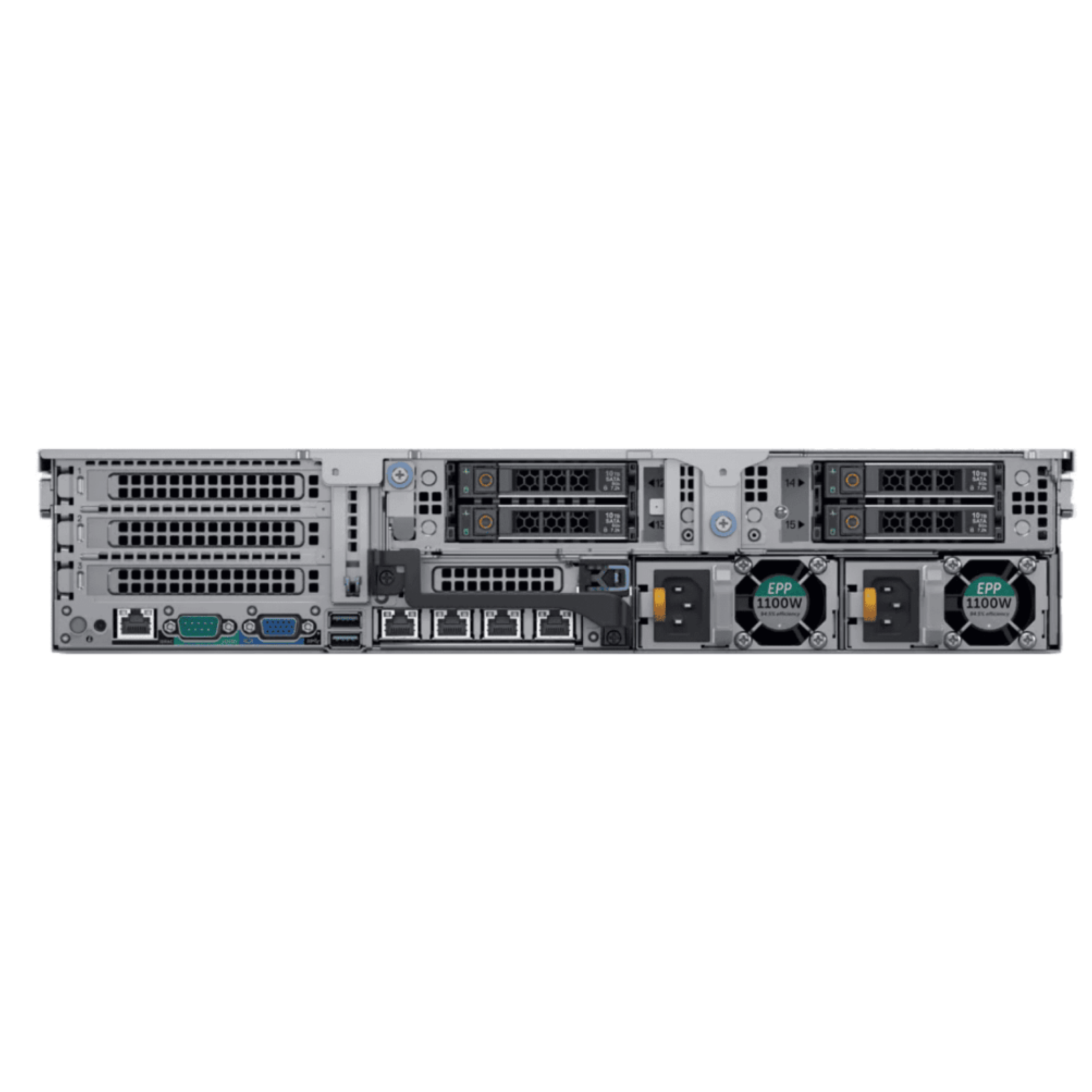
Networking — 4 Ports for Connectivity
The R740xd includes:
- 2 × 1Gb Ethernet — For management and standard traffic
- 2 × 10Gb Ethernet — For high-speed connections
This is flexibility in networking:
Typical Setup 1: Redundant Connections
- Two 10Gb ports connected to network core (redundant paths)
- Two 1Gb ports for backup or out-of-band management
- Ensures network connectivity even if one link fails
Typical Setup 2: Tiered Network
- Two 10Gb ports for data center traffic (storage, VM migration)
- Two 1Gb ports for standard network traffic
- Separates high-bandwidth from regular traffic
Typical Setup 3: Segregated Networks
- 10Gb to production network
- 10Gb to backup network
- 1Gb to management network
- 1Gb to out-of-band management
The flexibility means you can design your network optimally.
GPU and Accelerator Support — Future-Proof
The R740xd has multiple PCIe slots for GPU or accelerator cards:
GPU Options:
- Nvidia A100 (AI/ML training)
- Nvidia A10 (Inference and graphics)
- Nvidia V100 (HPC and visualization)
- AMD MI100 (AI/ML)
Accelerators:
- FPGA cards (custom computation)
- QuickAssist Technology (crypto acceleration)
- OpenFlow processors
Adding GPUs turns the R740xd into a:
- ✅ Machine learning training platform
- ✅ High-performance computing system
- ✅ Real-time analytics engine
- ✅ Video transcoding accelerator
GPU-accelerated workloads run 10-100x faster than CPU alone.
2U Rackmount Form Factor — Data Center Ready
2U means the server is 3.5 inches tall and mounts in a standard server rack.
Why 2U instead of 1U?
1U servers:
- ✅ Maximum density
- ✅ Fits more servers per rack
- ❌ Limited drive bays (typically 2-4)
- ❌ Cooling challenges (height limits airflow)
2U servers (like R740xd):
- ✅ Can fit 24 drive bays
- ✅ Better cooling (more height = better airflow)
- ✅ More processing power
- ✅ Expandability
- ❌ Takes more rack space
For storage-heavy or compute-heavy workloads, 2U makes sense.
Redundant Power Supplies — 24/7 Reliability
The R740xd has 2 × 750W redundant power supplies.
What does redundant mean?
If one power supply fails, the other immediately takes over. Your server keeps running. Your business does not stop.
Without redundancy:
- ❌ One power supply fails
- ❌ Server shuts down
- ❌ All virtual machines go offline
- ❌ Your customers cannot access their data
- ❌ Business loses money
With redundancy:
- ✅ One power supply fails (you will not even notice)
- ✅ Server continues running at full capacity
- ✅ You replace the failed PSU at your convenience
- ✅ Zero downtime
Redundancy is insurance. For production servers, it is essential.
Redundant Cooling System — No Overheating
High-performance servers generate heat. The R740xd has multiple fans for cooling.
System design:
- ✅ Hot air exhausted out the back
- ✅ Cool air drawn in the front
- ✅ Intelligent fan speed control (slow when cool, fast under load)
- ✅ Thermal monitoring to prevent overheating
- ✅ Multiple independent fan units (if one fails, others keep cooling)
Proper cooling:
- ✅ Extends hardware lifespan
- ✅ Prevents thermal throttling (CPU slowdown)
- ✅ Ensures reliable operation
Over-temperature? Server shuts down to protect itself. With proper cooling, this never happens.
Integrated iDRAC — Remote Management
iDRAC (Integrated Dell Remote Access Controller) is a separate computer inside the server.
What can you do with iDRAC?
- ✅ Power server on/off remotely
- ✅ Access BIOS remotely
- ✅ Monitor temperature, fan speed, power consumption
- ✅ View event logs and alerts
- ✅ Access console remotely (see exactly what server is displaying)
- ✅ Update firmware remotely
- ✅ Configure RAID remotely
Why is this valuable?
If your server is at a remote data center and something goes wrong, you do not need to travel there to fix it. You can diagnose and resolve most issues from your office.
iDRAC is included with the R740xd. No additional cost.
Operating System Support — Your Choice
The R740xd runs:
- ✅ Windows Server (2016, 2019, 2022)
- ✅ Linux (Red Hat, Ubuntu, CentOS, etc.)
- ✅ VMware ESXi (Hypervisor for virtualization)
- ✅ Hyper-V (Microsoft’s hypervisor)
- ✅ KVM (Open-source hypervisor)
This flexibility means:
- Use whatever operating system your applications require
- Mix operating systems (some VMs Windows, some Linux)
- Migrate between OS if needed later
Real-World Applications
Data Center Hosting Company
Host 1000 customers’ websites on a single R740xd running ESXi hypervisor. Each customer gets a virtual machine (or multiple VMs). The R740xd has enough CPU and storage to handle all of them with room to spare.
Revenue: Each customer pays ৳5,000/month. 1000 customers = ৳5M/month revenue from one server.
Large Organization Running Databases
A manufacturing company with 5000 employees runs their entire business on databases — ERP, inventory, accounting, HR, sales.
A single R740xd with 24 high-speed SAS drives and 44 cores handles all database workloads:
- ✅ Real-time inventory updates
- ✅ Order processing
- ✅ Financial reporting
- ✅ Concurrent user queries
- ✅ Backup operations
The 44 cores mean queries finish instantly. Employees are not waiting for data.
University Research Center
Research center runs climate modeling simulations that require massive computing power. A GPU-equipped R740xd with 44 cores completes simulations 50x faster than previous equipment.
Research that would take months now takes weeks. Breakthrough discoveries happen faster.
Video Production Company
A video production company uses the R740xd with GPU acceleration to render high-resolution video projects.
A 4K video that would take 200 hours to render on consumer equipment finishes in 4 hours on the GPU-accelerated R740xd.
Client projects turn around faster. Business capacity increases 50x.
Why Refurbished R740xd Makes Sense
The R740xd was released in 2019. It is proven, battle-tested, and widely deployed globally.
A refurbished R740xd in 2026:
- ✅ Has thousands of hours of real-world operation
- ✅ All bugs in firmware identified and fixed
- ✅ Parts readily available
- ✅ Strong community and extensive documentation
- ✅ Well-understood by system administrators
A new higher-generation server (R750, R760) costs 30-50% more but delivers only 15-25% better performance for most workloads.
For most organizations, a refurbished R740xd is the smart choice. You get proven, reliable infrastructure at excellent pricing.
Cost-Benefit Analysis
New R740xd: ৳1,500,000+
Refurbished R740xd (excellent condition): ৳800,000-1,200,000
Savings: ৳300,000-700,000 (25-40% discount)
That savings can be invested in:
- ✅ Additional drives and storage expansion
- ✅ RAM upgrades
- ✅ GPU accelerators
- ✅ Network infrastructure
- ✅ Backup systems
Same computing platform, lower initial investment, more capital available for expansion.
Specifications Summary
| Specification | Details |
|---|---|
| Model | Dell PowerEdge R740xd |
| Form Factor | 2U Rackmount |
| Processors | 2 × Intel Xeon Gold 6152 |
| Cores/Threads | 44 Cores / 88 Threads |
| Clock Speed | 2.1 GHz base, 3.7 GHz turbo |
| Cache | 66MB L3 Cache |
| Memory | 32GB DDR4 ECC Registered |
| Memory Slots | 24 DIMM (upgradeable to 768GB) |
| Drive Bays | 24 × 2.5″ SFF |
| Storage Support | SAS / SATA / SSD / NVMe |
| RAID | Dell PERC RAID Controller |
| Networking | 2×1Gb + 2×10Gb Ethernet |
| PCIe Slots | Multiple for GPU/Accelerators |
| Power Supply | 2 × 750W Redundant |
| Cooling | Redundant High-Efficiency Fans |
| Remote Management | Integrated iDRAC |
| OS Support | Windows / Linux / ESXi / Hyper-V |
| Condition | Refurbished – Excellent |
Expansion and Upgrade Path
Starting configuration:
- 2 × Xeon Gold 6152 (cannot upgrade, already maxed)
- 32GB RAM → Upgrade to 128GB, 256GB, or 768GB
- Some drives → Add more drives (up to 24 total)
- Network connectivity → Already robust (skip)
- Storage → Add GPU accelerators for performance boost
The R740xd was designed for upgrades. Add capability without replacing the server.
Expected Lifespan
With proper maintenance, the R740xd will serve 7-10+ years:
- ✅ Year 1-3: Peak performance
- ✅ Year 3-5: Excellent performance (minor component replacements)
- ✅ Year 5-7: Good performance (older generation, but still capable)
- ✅ Year 7-10: Still functional (use for less demanding workloads)
Longer lifespan = better ROI on your investment.
Who Should Buy the R740xd?
ISP or Data Center Provider
Need to host dozens of customers’ servers and applications. R740xd is perfect — plenty of CPU, tons of storage, growth capability.
Enterprise Data Center
Need high-performance server infrastructure. R740xd consolidates workloads and reduces total hardware count.
Financial Institution
Running databases with millions of transactions. The 44 cores handle concurrent load smoothly.
Research Organization
Compute-intensive research with GPU acceleration. R740xd with GPUs is powerful and cost-effective.
University
Hosting student databases, email systems, learning management systems. Virtualization on R740xd handles all of it.
Large Manufacturing Company
Running ERP, inventory, accounting, and analytics. Database-intensive operations benefit from 44 cores and fast storage.
Hosting or Cloud Provider
Consolidating customer virtual machines. One R740xd can replace 5-10 smaller servers.
Get the Dell PowerEdge R740xd in Bangladesh
For businesses and organizations in Bangladesh looking to invest in enterprise server infrastructure, Johan Computer offers the Dell PowerEdge R740xd with genuine product warranty, technical support, and competitive local pricing. As a trusted supplier of rack servers, enterprise storage solutions, networking equipment, and data center products, Johan Computer ensures you get the right hardware with the right support to keep your operations running smoothly.
Contact Johan Computer today to discuss your requirements, get a customized quote, or learn more about configuration options available for the Dell PowerEdge R740xd.