017 1223 6015






 017 1223

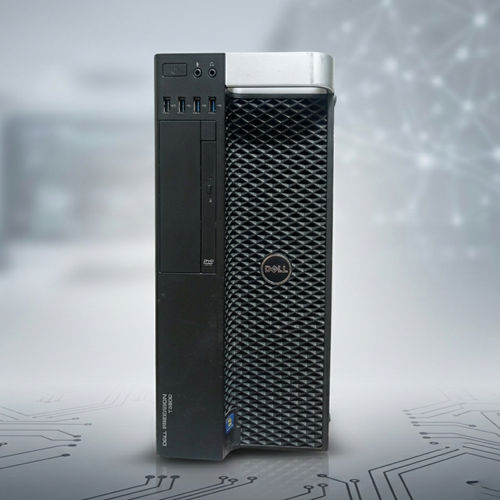

Dell Workstation BD — Professional Computing Solutions for Bangladesh
Welcome to Bangladesh’s most comprehensive Dell Workstation resource. Whether you are an architect, engineer, video editor, 3D designer, or creative professional — find the perfect Dell workstation for your professional needs.
What Is a Professional Workstation?
A professional workstation is engineered for demanding creative and technical work. It is different from consumer desktops and gaming PCs.
Key Differences:
| Aspect | Consumer PC | Professional Workstation |
|---|---|---|
| GPU | Gaming (GeForce) | Certified Professional (Quadro, FirePro) |
| Memory | Standard DDR4 | ECC Registered RAM |
| Reliability | Optimized for cost | Optimized for uptime |
| Software Support | Limited | Professional software certified |
| Color Accuracy | Approximate | Precise (for design/video) |
| Performance | Good for most tasks | Optimized for heavy professional loads |
| Lifespan | 3-4 years | 7-10+ years |
Why Professional Workstations Matter
For Architects Using AutoCAD:
- ✅ Open massive assemblies instantly
- ✅ Real-time 3D rendering of designs
- ✅ Smooth model manipulation
- ✅ Quick design iteration
For Engineers Running FEA Simulations:
- ✅ Multi-core CPU for parallel computation
- ✅ Quad-channel memory for data throughput
- ✅ Professional GPU for visualization
- ✅ Thermal design for sustained operation
For Video Editors:
- ✅ Real-time 4K timeline scrubbing
- ✅ Effects preview without lag
- ✅ Color grading in real-time
- ✅ Quick export and rendering
For 3D Artists:
- ✅ Complex geometry manipulation
- ✅ Real-time ray tracing preview
- ✅ GPU acceleration for rendering
- ✅ Multi-monitor support for creative tools
Why Dell Workstations?
Dell Precision is the most deployed professional workstation line globally.
Reasons to Choose Dell:
- Proven Reliability
- Thousands deployed worldwide
- Millions of hours in real-world use
- Battle-tested and reliable
- Professional Software Certification
- Autodesk (AutoCAD, Revit, Inventor)
- SolidWorks and Dassault systems
- Adobe Creative Suite
- Autodesk Maya, 3DS Max
- All major professional software certified
- Component Quality
- Enterprise-grade components
- Thermal design for continuous operation
- Power supplies rated for sustained load
- Professional cooling design
- Support and Documentation
- Extensive documentation
- Community support
- Driver availability
- Professional support options
- Upgrade Path
- Easy memory upgrades
- GPU upgrade capability
- Storage expansion
- Long lifespan (7-10+ years)
- Value for Money
- Used Dell workstations at 40-60% discount
- Professional features at reasonable cost
- Total cost of ownership favorable
Dell Workstation Models Available in Bangladesh
Entry-Level Workstations
Dell Precision T3500
- Intel Xeon W3500/W3600 series
- 6-core processors
- 12GB-24GB RAM
- Professional graphics card
- Price: ৳400,000 – ৳600,000 (refurbished)
- Best for: Small offices, starting professionals, budget-conscious
Dell Precision T3600
- Intel Xeon E5-2600 series
- 8 cores per processor
- 32GB DDR3 Quad Channel memory
- NVIDIA Quadro or AMD FirePro
- Price: ৳500,000 – ৳800,000 (refurbished)
- Best for: Architects, engineers, video editors, growing firms
Mid-Range Workstations
Dell Precision T5610
- Intel Xeon E5-1600/E5-2600 series
- Up to 12 cores
- 64GB+ DDR3 memory
- Dual GPU capability
- Price: ৳800,000 – ৳1,200,000 (refurbished)
- Best for: Data centers, large design firms, GPU-intensive work
High-Performance Workstations
Dell Precision T7610
- Dual Intel Xeon E5-2600 series
- Up to 16 cores per processor (32 total)
- 256GB+ memory
- Dual high-end GPU support
- Price: ৳1,200,000 – ৳1,800,000 (refurbished)
- Best for: Large enterprises, render farms, HPC applications
Choosing the Right Dell Workstation
For Small Office / Freelancer
Recommendation: Precision T3600
Why:
- ✅ Excellent value for money
- ✅ Adequate performance for most professional software
- ✅ 32GB memory sufficient for single professional
- ✅ Professional GPU support
- ✅ Room to upgrade if needed
Cost: ৳500,000 – ৳700,000
For Design Firm (5-10 Professionals)
Recommendation: Precision T5610
Why:
- ✅ More cores for rendering
- ✅ 64GB+ memory for complex projects
- ✅ Dual GPU support
- ✅ Handles sustained heavy workload
- ✅ Professional-grade reliability
Cost per workstation: ৳800,000 – ৳1,000,000
For Data Center / Render Farm
Recommendation: Precision T7610 (multiple units)
Why:
- ✅ Maximum processing power
- ✅ Dual GPU for acceleration
- ✅ High-end throughput
- ✅ Suitable for 24/7 operation
- ✅ Enterprise-grade
Cost per workstation: ৳1,200,000 – ৳1,500,000
For GPU-Intensive Work (AI/ML)
Any model + GPU Upgrade
Add:
- Nvidia A100 (best performance)
- Nvidia V100 (good for most work)
- Nvidia RTX 4000 (good value)
GPU adds ৳300,000 – ৳1,000,000 depending on model
Professional Workstation Applications
Architecture and Building Design
- AutoCAD
- Revit
- SketchUp
- BIM software
Dell Precision T3600 or T5610 adequate
Mechanical Engineering
- SolidWorks
- CATIA
- Inventor
- FEA simulations
Dell Precision T5610 recommended for FEA
Civil Engineering
- AutoCAD Civil 3D
- InfraWorks
- Revit Infrastructure
Dell Precision T3600 sufficient
Video Production
- Adobe Premiere Pro
- DaVinci Resolve
- Final Cut Pro
- Motion graphics
Dell Precision T5610+ for 4K work
3D Animation and VFX
- Blender
- Maya
- 3DS Max
- Cinema 4D
Dell Precision T5610+ with GPU recommended
Product Design and Visualization
- KeyShot
- V-Ray
- Corona Renderer
- Substance Painter
Dell Precision T5610 recommended
Scientific Visualization
- VisIt
- ParaView
- Tecplot
- Custom analysis software
Dell Precision T5610+ with GPU
New vs Used/Refurbished Dell Workstations
New Advantages
- ✅ Full manufacturer warranty (3-5 years)
- ✅ Latest generation components
- ✅ Latest firmware and drivers
- ✅ Peace of mind of new equipment
New Disadvantages
- ❌ 2-3x cost of refurbished
- ❌ Performance gains marginal (15-25%)
Used/Refurbished Advantages
- ✅ 40-60% cost savings
- ✅ Proven reliability (already in field)
- ✅ Immediate availability
- ✅ Performance adequate for most work
- ✅ Upgrade potential
Used/Refurbished Disadvantages
- ⚠️ Limited or no warranty
- ⚠️ May need minor repairs
- ⚠️ Older generation components
Recommendation: For Bangladesh market, used/refurbished Dell workstations offer excellent value. Professional work does not require newest generation — proven reliability is more important.
Memory Upgrade Guide
All Dell workstations are upgradeable:
T3500:
- Up to 24GB (3 × 8GB)
- Cost: ৳5,000-8,000 per 8GB module
T3600:
- Up to 128GB (8 × 16GB)
- Cost: ৳6,000-10,000 per 16GB module
T5610:
- Up to 256GB (16 × 16GB)
- Cost: ৳6,000-10,000 per 16GB module
T7610:
- Up to 512GB (32 × 16GB)
- Cost: ৳6,000-10,000 per 16GB module
When to Upgrade:
- Current memory consistently at 80%+ usage
- Swapping to disk (system becomes slow)
- Working with massive files (video, 3D models, datasets)
GPU Upgrade Options
All Dell workstations support GPU upgrades:
Entry-Level Professional GPU:
- Nvidia Quadro 600 (included in T3600)
- AMD FirePro V4900
- Cost: ৳100,000-200,000
Mid-Range Professional GPU:
- Nvidia Quadro P2000/P4000
- AMD FirePro V5900
- Cost: ৳300,000-500,000
High-Performance GPU:
- Nvidia V100/A100
- AMD FirePro V7900
- Cost: ৳800,000 – ৳1,500,000+
When to Upgrade:
- Rendering taking too long
- GPU-accelerated software not fast enough
- Real-time preview lagging
- Working with large datasets
Storage Upgrade Guide
Dell workstations accept multiple drive types:
SSD (Fast, for OS and apps):
- 512GB-1TB recommended
- Cost: ৳30,000-50,000
- Speeds up everything
SAS HDD (Fast, for working files):
- 2TB-4TB
- Cost: ৳15,000-25,000
- Good for active projects
SATA HDD (Capacity, for archive):
- 4TB-8TB
- Cost: ৳10,000-15,000
- Good for file archive
Recommended Setup:
- 1 × 512GB SSD (OS + applications)
- 1 × 2TB SAS (current project files)
- External drive for backup
Dell Workstation vs Alternatives
Dell vs HP (Workstation Z Series)
Dell Advantages:
- ✅ Better value for money in Bangladesh market
- ✅ More widely available used/refurbished
- ✅ Established support network
- ✅ Easier to find replacement parts
HP Advantages:
- Slightly newer designs
- Some model-specific features
- Strong enterprise support
Verdict: Dell workstations better value in Bangladesh
Dell vs Lenovo (ThinkStation)
Dell Advantages:
- Better GPU support
- Wider component availability
- More refurbished inventory in market
Lenovo Advantages:
- Compact designs
- Strong enterprise partnerships
Verdict: Dell more suitable for professional work
Reliability and Expected Lifespan
Dell professional workstations last:
- Year 1-3: Peak performance, handles all applications
- Year 3-5: Excellent performance (may need minor upgrades)
- Year 5-7: Good performance (some newer features limited)
- Year 7-10: Still functional (use for less demanding work)
Proper maintenance:
- ✅ Keep clean from dust
- ✅ Ensure adequate cooling
- ✅ Replace thermal paste every 3-4 years
- ✅ Monitor hard drive health
- ✅ Update drivers periodically
Cost-Benefit Analysis: Workstation vs Consumer PC
Consumer PC Scenario
- Cost: ৳400,000
- Lifespan: 3-4 years
- Reliability: Decent, some crashes
- Professional software support: Limited
- Total cost over 5 years: ৳800,000 (replace once)
Dell Workstation Scenario
- Cost: ৳600,000 (used/refurbished)
- Lifespan: 7-10 years
- Reliability: Excellent, no crashes
- Professional software support: Full
- Total cost over 5 years: ৳600,000 (one purchase)
Advantage: Workstation wins on reliability, software support, and total cost over time.
Installation and Setup
Receiving your Dell workstation:
- Visual Inspection — Check for shipping damage
- Power On Test — Verify it powers on
- Component Verification — Confirm specs match listing
- OS Installation — Fresh OS install recommended
- Driver Installation — Install chipset, GPU, network drivers
- Software Installation — Install professional applications
- Performance Testing — Verify performance meets expectations
Typical setup time: 2-4 hours
Warranty and Support
When buying refurbished Dell workstations:
Typically Includes:
- 30-90 day hardware warranty (replacement guarantee)
- Support for initial setup issues
- Driver assistance
What to Ask Seller:
- ✅ Warranty duration?
- ✅ What does warranty cover?
- ✅ How to claim warranty?
- ✅ Replacement process if defective?
- ✅ Return policy?
Maintenance and Care
Keep your Dell workstation in top condition:
Monthly:
- ✅ Check temperature (should be <60°C idle)
- ✅ Listen for unusual fan noise
- ✅ Verify all lights functioning normally
Quarterly:
- ✅ Clean dust filters
- ✅ Check hard drive health (if HDD)
- ✅ Review system logs for errors
Annually:
- ✅ Professional cleaning of internal components
- ✅ Replace thermal paste on CPU
- ✅ Check all connections are tight
- ✅ Update firmware if available
FAQ: Dell Workstation BD
Q: How long will a used Dell workstation last?
A: 5-10+ years with proper maintenance. Many Dell T3500s from 2010 are still running in 2026.
Q: Can I upgrade GPU on any Dell workstation?
A: Yes, all models support GPU upgrades. Check PCIe slot availability and power supply capacity.
Q: Is 32GB RAM enough for CAD work?
A: Usually yes. But if working with massive assemblies (10,000+ parts), consider 64GB.
Q: Should I buy new or refurbished?
A: For Bangladesh market, refurbished offers best value. Performance difference from new is marginal for most professional work.
Q: What professional software is certified for Dell workstations?
A: Essentially all major professional software — AutoCAD, SolidWorks, Revit, Adobe Creative Suite, Blender, etc.
Q: How much does GPU upgrade cost?
A: Nvidia Quadro 600: ৳100K-200K
Quadro P4000: ৳400K-600K
V100: ৳1M+
Q: Can I use gaming GPU on workstation?
A: Technically yes, but not recommended. Professional software may not work optimally. Professional GPU certification ensures compatibility.
Q: What’s included with used workstation?
A: Typically: CPU, motherboard, RAM, power supply, cooling system, case. Ask about:
- Included hard drives/SSD
- Included GPU
- Cables and documentation
- Operating system
Browse Our Dell Workstation Selection
Johan Computer stocks:
- ✅ Dell Precision T3500 (entry-level)
- ✅ Dell Precision T3600 (popular mid-range)
- ✅ Dell Precision T5610 (professional grade)
- ✅ Dell Precision T7610 (high-performance)
- ✅ Upgrade components (RAM, GPU, drives)
- ✅ Cables, thermal paste, replacement parts
Each workstation:
- ✅ Fully tested and verified
- ✅ Transparent specifications
- ✅ Honest condition description
- ✅ Local warranty available
- ✅ Technical support included
Get Expert Help Choosing Your Workstation
Not sure which Dell workstation is right for you?
Our professional equipment specialists can:
- ✅ Assess your professional software requirements
- ✅ Recommend appropriate model and specs
- ✅ Configure optimal upgrades for your workflow
- ✅ Plan for future growth and expansion
- ✅ Assist with installation and setup
- ✅ Provide ongoing technical support
In Bangladesh, you can get the original Dell Precision T3600 Workstation from Johan Computer. We have a large collection of latest Workstations, Enterprise Servers, Graphics Solutions, and Professional IT Products at the best price.
For more related products, visit our internal links:
For official specifications, you can also visit the Dell official website.
Contact Johan Computer today to get the latest price and availability of Dell workstations in Bangladesh.